

Google Spam Update Hit Your Website? Here’s What Helped Me Recover a Client Site
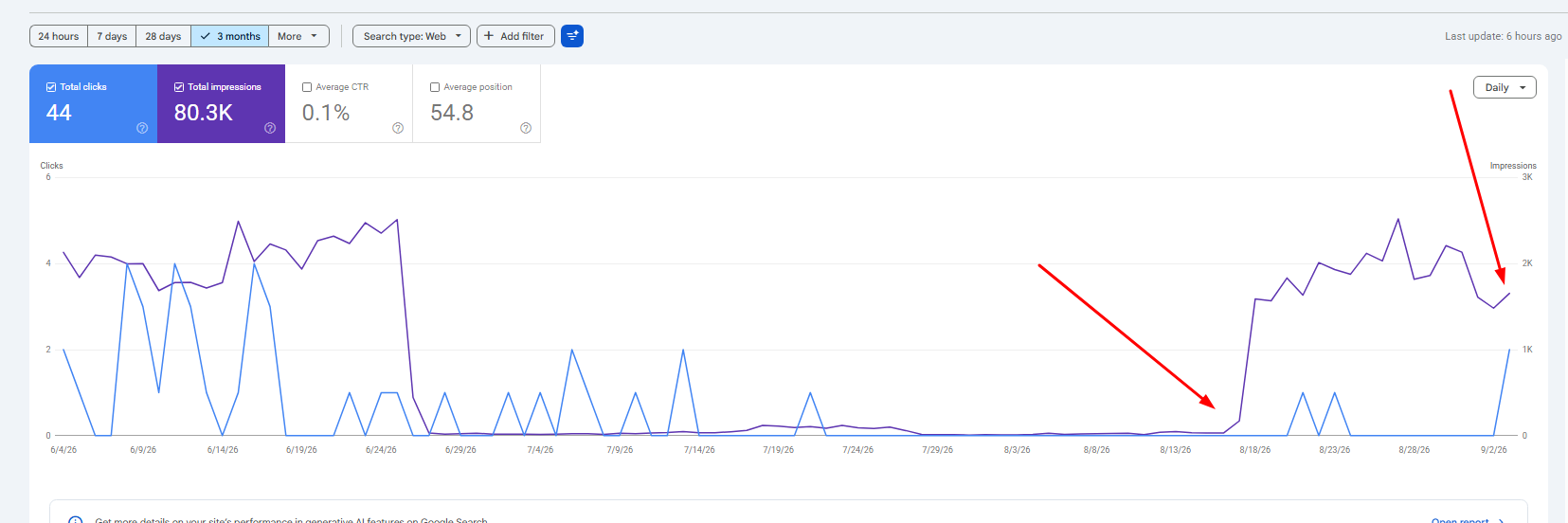
When one of my client websites lost visibility after a Google Spam Update, I didn’t look for one “magic fix.” I focused on improving the overall usefulness, originality, topical depth, internal linking and SEO foundation of the website.
The Short Version
The recovery strategy was built around four things: remove or improve low-value pages, add something competitors did not have, expand topical coverage, and fix fundamental SEO and internal linking issues.
Google itself recommends that websites affected by a spam update review its Spam Policies. Google also explains that improvements may take time to be recognized by its automated systems.
A Google Spam Update can change the trajectory of an SEO campaign very quickly. Pages that generated leads for months can lose positions, informational traffic can disappear, and entire topical clusters can become less visible.
The first reaction is usually to ask:
- Was it AI content?
- Was it backlinks?
- Was it thin content?
- Was it keyword stuffing?
- Was it a technical SEO problem?
- Did Google dislike our location pages?
- Did we publish too much content?
Those questions can be useful, but they can also send you in ten different directions.
That question became the foundation of the recovery process.
Google says its spam-detection systems operate continuously and that significant improvements to those systems may be released as Google Search spam updates. Sites experiencing changes after a spam update are advised to review Google’s spam policies.
1. Diagnose the Drop Before Changing Everything
Before deleting articles, rewriting service pages or building new links, I first want to know exactly where the loss happened.
Google Search Console is one of the first tools I use. I compare the period before the decline with the period after it and segment the data.
What I Look At
- Total organic clicks
- Total impressions
- Average position
- Queries that lost visibility
- Landing pages that lost rankings
- Brand vs non-brand queries
- Commercial vs informational pages
- Service vs location pages
- Desktop vs mobile
- Country-level changes
| What You See | Possible Area to Investigate | What I Check |
|---|---|---|
| Most of the site declines | Site-wide quality or trust | Content quality, spam risks, technical health, authority |
| Blog loses most traffic | Informational content | Originality, usefulness, scaled content, intent |
| Location pages decline | Template-heavy pages | Unique local value, duplication, doorway-like patterns |
| Service pages decline | Commercial relevance | Intent, content depth, competitors, links |
| Rankings remain but clicks fall | SERP / CTR changes | Titles, snippets, AI features, SERP layout |
| Sudden indexing loss | Technical issue | Noindex, robots.txt, canonical tags, manual actions |
For a deeper workflow, see my Google Search Console SEO audit guide.
2. Fix Thin and Low-Value Pages
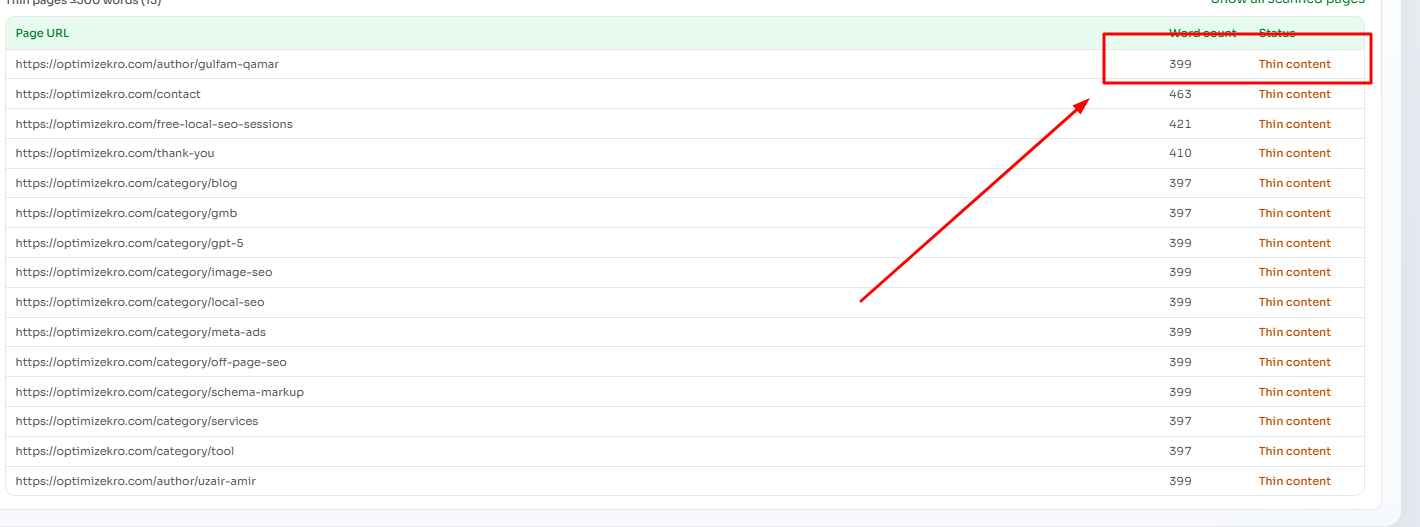
One of the biggest areas we addressed was content that existed but did not provide enough reason for a user—or search engine—to choose it.
Examples of Pages I Review Closely
Thin Content
- Very basic service pages
- Short articles that answer little
- Pages missing key decision information
- Weak product or category pages
Duplicate / Templated Content
- Near-identical location pages
- Multiple pages targeting the same intent
- Template pages with only keywords changed
- AI pages with nearly identical structures
Outdated Content
- Old statistics
- Outdated recommendations
- Broken external references
- Obsolete product or service information
Search-First Content
- Pages created only because a keyword exists
- Generic rewritten competitor content
- Pages outside the site’s real expertise
- Mass-produced articles with little unique value
Low Traffic Does Not Automatically Mean Low Quality
A niche service page may only have 20 relevant searches per month but still be commercially important. I do not recommend deleting pages simply because analytics shows little traffic.
Every Weak Page Goes Into One of Four Buckets
| Action | When I Use It |
|---|---|
| Keep | The page already serves a useful, distinct purpose. |
| Improve | The topic matters, but the page lacks depth, originality or usefulness. |
| Merge | Two or more pages satisfy essentially the same search intent. |
| Remove / Redirect | The page serves no meaningful purpose and cannot justify remaining separate. |
Google’s people-first content guidance encourages site owners to evaluate whether content provides original information, substantial coverage, useful analysis and meaningful additional value compared with competing pages.
3. Stop Making Articles Longer. Make Them More Useful.
One of the biggest mistakes I see after ranking drops is adding another 1,000 words to every page.
More words do not automatically mean more value.
Google specifically says publishers should not write to a preferred word count simply because they believe Google has one.
Instead, We Started Adding Things Competitors Didn’t Have
- Small calculators
- Free tools
- Checklists
- Downloadable templates
- Original tables
- Comparison data
- Expert observations
- Real examples
- Original screenshots
- Decision-making frameworks
- Step-by-step processes
- Customer questions collected from real data
| Generic Content | Higher-Value Alternative |
|---|---|
| Explains pricing | Add a pricing table or calculator |
| Explains a process | Add a downloadable checklist |
| Lists pros and cons | Add a side-by-side comparison table |
| Repeats statistics | Add original research or first-party data |
| Generic recommendations | Add first-hand experience and case examples |
| Stock imagery | Add original screenshots, diagrams or project photos |
4. Use Google Search Console as a Content Finding Tool
Search Console is not only a reporting platform. I use it as a direct content research tool.
My Basic GSC Process
Open Performance
Go to Search Console → Performance → Search Results.
Filter by Page
Select an important service page, article or commercial landing page.
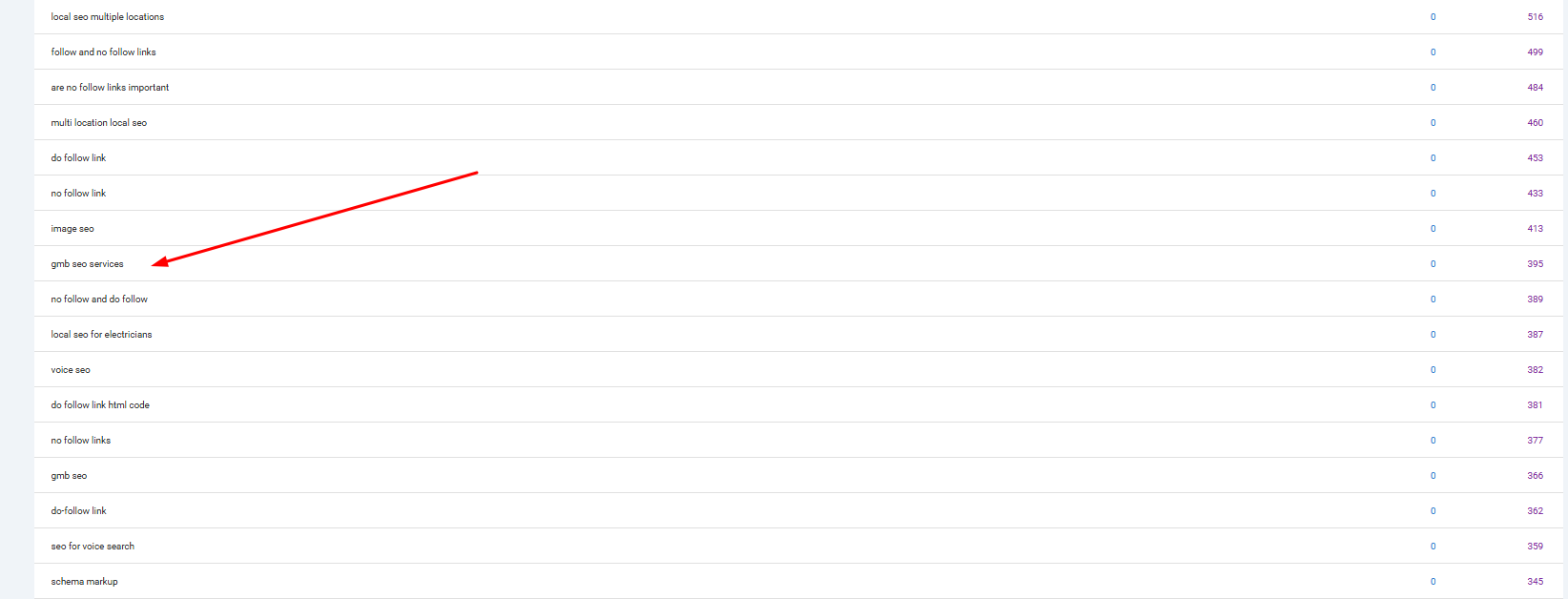
Review Queries
Find relevant queries receiving impressions where the page ranks roughly outside the strongest positions or does not fully answer the search.
Find Missing Sections
Determine whether the query deserves a better section, comparison, table, FAQ, example or separate supporting page.
Example
Imagine an emergency plumbing page receives impressions for:
- emergency plumber cost
- what counts as a plumbing emergency
- emergency plumbing response time
- emergency plumber vs regular plumber
Instead of blindly adding more text, I would consider adding:
- A pricing table
- A “what counts as an emergency?” checklist
- A response-time explanation
- An emergency vs regular plumbing comparison
This is much closer to data-driven content optimization. See my complete Google Search Console guide for additional GSC audit ideas.
5. Build a Stronger Topical Map
We also consistently expanded content around the site’s main topic. But the goal was not to publish as many pages as possible.
It was to make the website more complete for the people who actually need the company’s services.
Important Clarification
I use the terms Inner Topical Shell and Outer Topical Shell as my own strategy framework. They are not official Google terminology.
Inner Topical Shell
The inner shell contains topics directly connected to the core service, product or transaction.
For a roofing company, this could include:
- Roof repair
- Roof replacement
- Roof installation
- Emergency roofing
- Metal roofing
- Shingle roofing
- Commercial roofing
- Residential roofing
- Roofing cost
- Roof inspections
- Roof repair vs replacement
- Roofing warranties
- Service-area pages
Outer Topical Shell
The outer shell contains supporting topics related to the broader problems, education and decision-making process of the same audience.
- Signs of storm damage
- Home insurance roof claims
- Roof ventilation
- Attic moisture
- Gutter problems
- Roof maintenance
- Building permits
- Roofing terminology
- Hail damage
- Energy-efficient roofing
- Solar panels and roofing
- Seasonal maintenance
| Inner Topical Shell | Outer Topical Shell |
|---|---|
| Main services | Related customer problems |
| Sub-services | Industry education |
| Pricing | Maintenance |
| Products | Regulations |
| Comparisons | Terminology |
| Locations | Related systems |
| Immediate buying intent | Broader customer journey |
Topical Authority Does Not Mean Publishing 5,000 Pages
Google’s spam policies describe scaled content abuse as producing many pages primarily to manipulate rankings rather than help users. The problem can exist regardless of whether pages are created using AI, automation or humans.
Read Google’s official scaled content abuse policy.
6. Improve Internal Linking and Topical Connections
Publishing good content is only part of the job. Search engines and users also need logical pathways connecting the content.
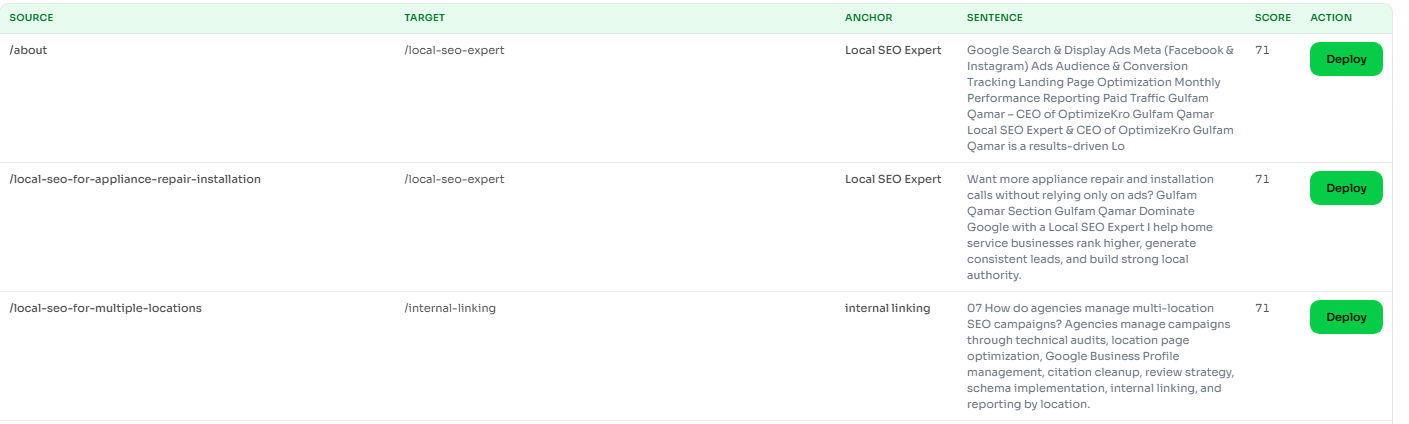
Google Search Essentials specifically recommends making links crawlable so Google can discover other pages on a website. See Google’s Search Essentials.
What I Check During an Internal Link Audit
- Orphan pages
- Important pages with too few internal links
- Broken internal links
- Links going through unnecessary redirects
- Weak or vague anchor text
- Excessive click depth
- Disconnected topic clusters
- Missed contextual linking opportunities
- Commercial pages receiving little supporting authority
My Basic Internal Linking Model
A supporting article should normally consider links to:
- The main pillar topic
- A relevant commercial service page
- A closely related supporting article
- A deeper resource where useful
You can see my full process in the OptimizeKro Internal Linking SEO guide and audit framework.
7. Fix the Basic On-Page SEO Issues
A recovery strategy should not ignore basic SEO fundamentals. During the cleanup, I also review the page-level signals that help users and search engines understand each URL.
Metadata & Structure
- Page titles
- Meta descriptions
- H1 structure
- H2/H3 hierarchy
- Clean URLs
Content Relevance
- Primary search intent
- Keyword targeting
- Missing subtopics
- Content cannibalization
- Duplicate sections
Content Experience
- Useful images
- Tables
- Scannable sections
- Relevant FAQs
- Clear next steps
Connections
- Internal links
- Authoritative references
- Breadcrumbs
- Related resources
- Appropriate structured data
For a page-level implementation framework, read my On-Page SEO guide.
8. Find and Fix Content Cannibalization
A site may also have several URLs targeting nearly identical intent. Different title tags do not automatically justify separate pages.
For example:
- /seo-services/
- /professional-seo-services/
- /seo-company/
- /seo-agency/
- /best-seo-company/
If these pages all answer essentially the same need, consolidating them may create a clearer architecture than forcing each page to compete separately.
| Situation | Potential Action |
|---|---|
| Same intent + multiple weak pages | Merge into one stronger page |
| One strong page + weaker duplicate | Consolidate and redirect where appropriate |
| Similar keywords but different intent | Keep separate |
| Unique location intent | Keep if the page provides meaningful local value |
| Old article replaced by a new guide | Consolidate or redirect |
9. Check for Scaled and Low-Originality Content
This is particularly important for websites that scaled content aggressively.
Google’s current spam policies explain that scaled content abuse can involve large amounts of unoriginal content created primarily to manipulate rankings, regardless of the production method.
Patterns Worth Investigating
- Hundreds of articles generated quickly with little editorial review
- Near-identical city pages
- Programmatic pages where only variables change
- Rewritten competitor pages
- Stitched or scraped content
- Automatically generated FAQs adding little value
- Pages outside the site’s real subject expertise
- Content produced solely because keyword volume exists
AI Is Not Automatically the Problem
Google has separate guidance on using generative AI content. AI can assist content production, but mass-generating pages without adding value can violate scaled content abuse policies.
What I Prefer to Add to AI-Assisted Content
- Human editorial review
- Original screenshots
- Real examples
- First-hand experience
- Original calculations
- Expert commentary
- First-party data
- Clear sourcing
- Useful tools and templates
10. Improve Experience, Expertise and Trust Signals
Content should make it easy for the reader to understand who created it, why that person is qualified to discuss the subject and what evidence supports important claims.
Useful trust improvements may include:
- Clear author names
- Detailed author biographies
- Relevant experience
- Reviewer information where appropriate
- About page
- Contact information
- Case studies
- Original screenshots
- Transparent methodology
- Authoritative citations
- Real project examples
Google’s people-first content documentation specifically encourages publishers to consider whether content demonstrates first-hand expertise and provides clear background about the author or site.
You can learn more about my experience and OptimizeKro on our About page, or see real SEO campaign methodology in our B2B SEO case study.
11. Compare Your Page Against What Already Ranks
This is one of the most useful exercises in the recovery process.
Open the leading results for your target topic and objectively compare their usefulness with your page.
| Content Element | Your Page | Competitor A | Competitor B | Competitor C |
|---|---|---|---|---|
| Search intent match | Check | Check | Check | Check |
| First-hand experience | ? | ? | ? | ? |
| Original screenshots | ? | ? | ? | ? |
| Original data | ? | ? | ? | ? |
| Calculator / tool | ? | ? | ? | ? |
| Useful comparison table | ? | ? | ? | ? |
| Real case study | ? | ? | ? | ? |
| Downloadable resource | ? | ? | ? | ? |
If the only clear advantage is “our article has 500 more words,” I would keep improving it.
12. Don’t Ignore Technical SEO
Not every traffic decline is purely a content problem. Technical problems can prevent otherwise useful pages from being crawled, indexed or understood properly.
Crawling
- robots.txt
- Broken links
- Crawl traps
- Parameter URLs
- Internal crawl paths
Indexing
- Noindex directives
- Canonical tags
- Duplicate URLs
- Sitemap issues
- Index coverage patterns
Architecture
- Orphan pages
- Click depth
- Topic clusters
- Breadcrumbs
- Navigation structure
Experience
- Mobile usability
- Core Web Vitals
- Heavy scripts
- Image optimization
- Layout problems
Google maintains its technical requirements and key optimization guidance inside Google Search Essentials.
13. Prioritize the Pages Most Likely to Matter
When a website contains hundreds or thousands of URLs, trying to improve everything simultaneously can waste time.
Priority 1: Revenue Pages
Start with pages historically responsible for leads, sales, calls or high-value traffic.
Priority 2: Pages That Fell From Strong Rankings
A page dropping from position 3 to position 12 is often more actionable than a page moving from position 78 to 90.
Priority 3: High-Impression Pages
Search Console may expose pages receiving meaningful impressions but weak clicks or positions.
Priority 4: Site-Wide Quality Problems
Address duplicate content, thin pages, cannibalization and scaled-content patterns.
Priority 5: New Topical Expansion
Once the foundation improves, expand the content map more confidently.
14. My 90-Day Google Update Recovery Framework
| Period | Primary Goal | Actions |
|---|---|---|
| Days 1–15 | Diagnose | GSC analysis, update timing, affected pages, manual actions, indexation, spam-policy review and competitor analysis. |
| Days 16–30 | Remove major weaknesses | Consolidate cannibalization, fix major thin pages, remove useless content, repair internal links and technical blockers. |
| Days 31–60 | Upgrade important pages | Add original insights, tables, screenshots, data, FAQs, examples, tools, templates and stronger internal links. |
| Days 61–90 | Expand topical depth | Build supporting content around services, problems, costs, comparisons, processes, locations and customer education. |
Recovery Is Not Always Immediate
Google says that after spam-related changes, its automated systems may learn over a period of months that a site complies with its spam policies. That means making a change today does not guarantee rankings return tomorrow.
15. What I Would NOT Do After a Google Spam Update
Rewrite Everything With AI
Replacing generic content with different generic content does not solve the underlying problem.
Delete Hundreds of Pages Blindly
Some pages may need consolidation or improvement rather than deletion.
Add 1,000 Words Everywhere
More content is useful only when it contributes something the visitor needs.
Stuff More Keywords
The problem is rarely solved by repeating the target query more frequently.
Buy Hundreds of Links Immediately
Links do not substitute for fixing serious content, policy or technical issues.
Publish Hundreds of Articles
Topical coverage should improve usefulness, not simply increase URL count.
If you are reviewing the authority side of a recovery campaign, see our Off-Page SEO and link building guide.
16. Page Quality Scorecard I Use for Prioritization
This is not a Google ranking score. It is simply an internal framework that helps me compare pages consistently.
| Area | Score |
|---|---|
| Search intent match | 1–5 |
| Content completeness | 1–5 |
| Originality | 1–5 |
| First-hand experience | 1–5 |
| Trust signals | 1–5 |
| Supporting evidence | 1–5 |
| User experience | 1–5 |
| Visual value | 1–5 |
| Internal linking | 1–5 |
| Conversion path | 1–5 |
Total possible internal score: 50.
Google Spam Update Recovery Checklist
Diagnosis
- Confirm traffic decline date
- Compare Google update dates
- Review GSC performance
- Check manual actions
- Check security issues
- Segment affected page types
- Compare query losses
Content
- Identify thin pages
- Find duplicate pages
- Find outdated content
- Check cannibalization
- Review search intent
- Add original insights
- Add useful tables
- Add real examples
Differentiation
- Compare top-ranking pages
- Find information gaps
- Add original data
- Add calculators where useful
- Add templates
- Add checklists
- Add screenshots
- Add first-hand experience
Topical Coverage
- Define core topic
- Map main services
- Map sub-services
- Map customer problems
- Map pricing queries
- Map comparisons
- Map informational topics
- Connect clusters internally
On-Page SEO
- Review title tags
- Review H1s
- Improve heading structure
- Review image alt text
- Improve internal links
- Check URLs
- Improve CTAs
- Review structured data
Technical SEO
- Crawl website
- Review robots.txt
- Review XML sitemap
- Check noindex tags
- Review canonicals
- Find broken links
- Find orphan pages
- Check mobile experience
Ask: “Why would Google choose this page over every other page already ranking?”
If you cannot clearly answer that question, that is usually where I would start improving the site.
Maybe your advantage is original data. Maybe it is a useful calculator. Maybe it is first-hand experience. Maybe it is better local information. Maybe it is a downloadable template. Maybe it is a clearer comparison.
The important part is that the improvement should be useful to the person landing on the page—not something added only because an SEO checklist told you to add it.
Google Spam Update Recovery FAQs
Can a website recover from a Google Spam Update?
Recovery is possible, but it is not guaranteed. Google recommends that sites affected by spam updates review its spam policies and make appropriate changes. Google’s automated systems can take time to recognize sustained compliance.
How long does Google Spam Update recovery take?
There is no universal recovery timeline. Google says automated systems may learn over a period of months that a site complies with its spam policies. The amount of time required will depend on the nature and scale of the problem.
Should I delete thin content after a Google update?
Not automatically. Evaluate whether the page has a legitimate purpose first. Depending on the situation, the correct action may be to keep, improve, consolidate, redirect or remove the page.
Can AI-generated content cause SEO problems?
AI itself is not automatically a problem. Google’s scaled content abuse policy focuses on large amounts of low-value content created primarily to manipulate rankings, regardless of whether AI, automation or humans created it.
Should I increase word count after rankings drop?
Not merely to make a page longer. Add information when it improves the visitor’s ability to understand the topic, solve a problem or make a decision.
Does topical authority help a website recover?
Building useful depth around your genuine area of expertise can improve the completeness and usefulness of a website. It should not be treated as permission to mass-publish low-value keyword pages.
Should I continue publishing new content during recovery?
You can continue publishing genuinely useful content, but I normally prioritize fixing serious problems and improving important existing pages before aggressively expanding the site.
What pages should I fix first?
I generally prioritize revenue-generating pages, pages that previously held strong rankings, pages with meaningful Search Console impressions, important service pages, and URLs with obvious quality or technical problems.
What is the biggest mistake after a Google update?
Making dozens of unrelated changes without diagnosing the actual pattern. If you rewrite content, delete pages, buy links, change titles and publish hundreds of new articles simultaneously, it becomes very difficult to understand what actually improved or harmed the website.
Official Google Resources Used in This Recovery Framework
Need Help Diagnosing an SEO Traffic Drop?
OptimizeKro helps businesses identify content quality problems, technical SEO issues, weak internal linking, topical gaps and missed organic search opportunities. The goal is not another quick SEO trick—it is to build a stronger search foundation.
Visit OptimizeKro View SEO Case Study